Free AI Detector Comparison 2026 The Most Reliable Options Tested
· 21 min read
Why Reliable Free AI Detection Matters More Than Ever
The internet is drowning in machine-written words. In 2026, research shows that 74% of new web pages contain AI-generated text, according to AI Content Statistics 2026. That number comes from a study of 900,000 pages. And it keeps climbing.
This shift creates a real crisis for anyone who needs to trust what they read. Think about a teacher grading essays. An editor reviewing a guest post. A hiring manager reading cover letters. How do they know the words came from a real person?

Free AI detectors try to answer that question. But here is the problem. Their accuracy varies wildly. Some tools flag human writing as AI. Others let AI-written text slip right through. False accusations happen. Trust breaks down. And the problem only gets bigger.
That is why finding a reliable tool matters so much right now. A thorough comparison, like the best free ai detector in 2026, can help you sort through the noise and find answers you can actually trust.
One option that keeps getting attention is Winston AI. Its free tier gives you a real chance to test accuracy without spending a dime. But how does the Winston AI detector free version compare to other popular free tools? And what should you watch out for before relying on its results?
This guide puts the top free AI detectors head to head. We take a deep look at accuracy, features, and real-world performance. Whether you teach students, create content, or just want to verify what is real, you will find practical help here.
Let us start with what makes a good AI detector and why getting it wrong costs more than most people realize.
Why AI Detection Matters in 2026: The Stakes for Education, Marketing, and Publishing
AI writing is not just a passing trend. It is reshaping how we create, share, and trust information every single day.
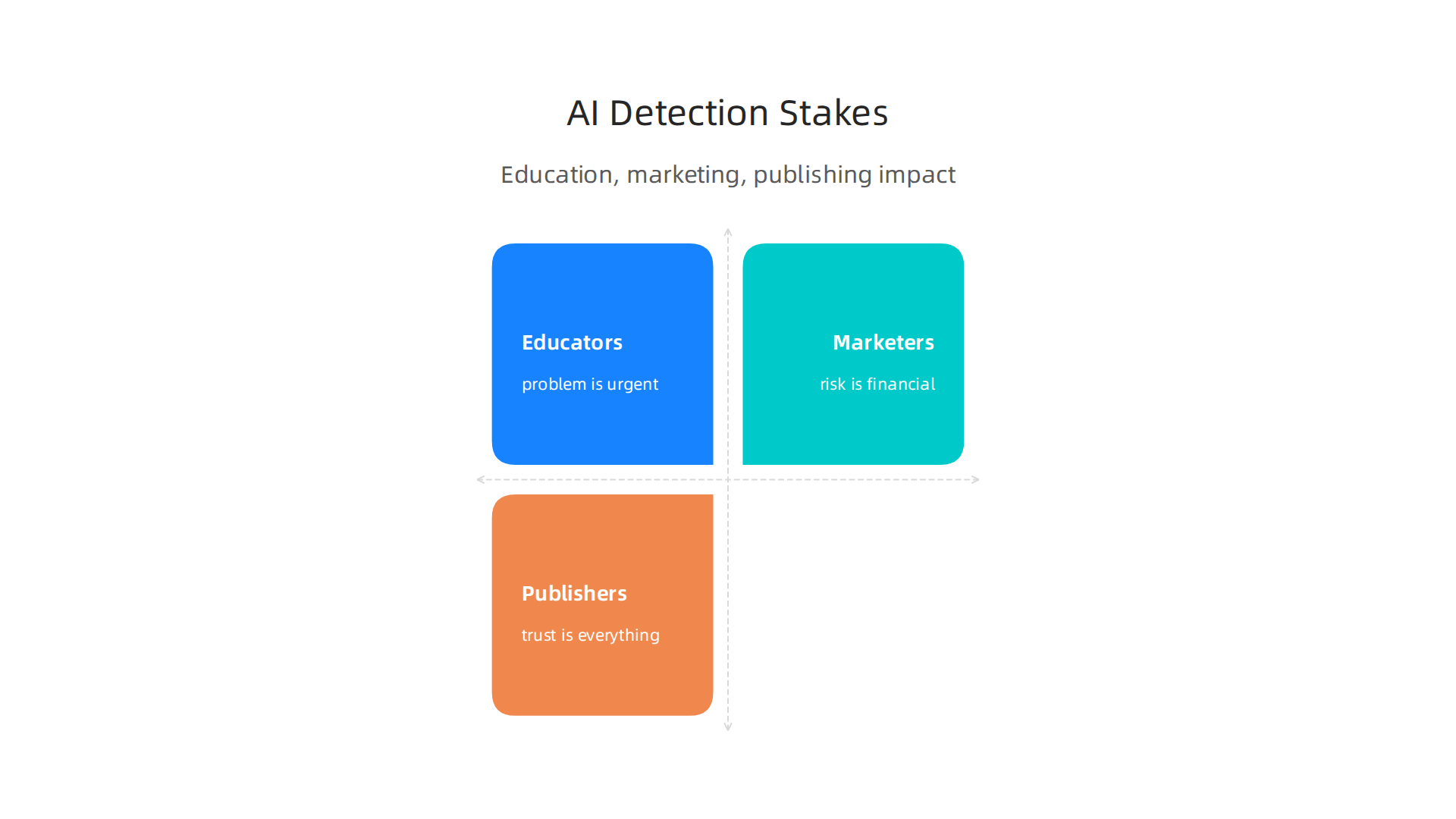
And the stakes are different depending on who you are.
For educators, the problem is urgent. Students now have easy access to tools that write essays, solve math problems, and answer test questions. Teachers cannot always tell the difference. A student using AI to write a term paper might never get caught. Meanwhile, a student who writes their own work might get falsely accused. The AI detection statistics for 2026 show that 73% of businesses already use AI for content creation. Classrooms are feeling that same pressure. Many schools now look for a reliable way to verify student work, like using a plagiarism checker on Turnitin to catch AI-written submissions.
**For marketers and SEO professionals, the risk is financial.
** Search engines in 2026 are getting better at spotting AI content. Google has made it clear that helpful, human-written content ranks higher. If a blog or product page looks like a machine wrote it, it could drop in search results. That means fewer visitors, fewer sales, and a damaged brand reputation. Marketers who cannot tell AI content from human content are flying blind.
For publishers and journalists, trust is everything. Readers want to know that the news, analysis, and opinions they consume come from real people. When AI content slips into articles without disclosure, public trust breaks down. And once trust is gone, it is very hard to win back.
The good news is that tools like the winston ai detector free version give people a fighting chance. But the real question is how well these tools actually work in practice. And that depends a lot on the market they serve. The AI detector market share analysis for 2026 shows this industry is growing fast, valued at nearly one billion dollars this year alone. That growth reflects a simple truth: people need answers they can rely on. If you are tired of guessing whether content is real or machine-made, you might want to explore how the Quietly Hijacked note explains the hidden systems shaping what you see every day.
How Free AI Detectors Work: The Technology Behind the Curtain
Most free AI detectors, including the winston ai detector free tool, rely on two main ideas to spot machine-written text: perplexity and burstiness. Perplexity measures how predictable your word choices are. AI models tend to pick the most likely next word, so their sentences often score very low in perplexity. Humans surprise us more. Burstiness looks at how much your sentence length and structure vary. Human writing swings between short and long sentences, while AI writing often stays steady and flat. These two metrics form the backbone of many detection tools.
But not all detectors work the same way. Some use statistical classifiers that compare your text to what an AI would produce. Others rely on watermark-based detection where the AI model itself plants a hidden pattern that scanners can read. The approach changes how accurate the tool is. According to one comparison of best AI detection tools (2026), tests show that no single method catches everything.
Here is the catch with free tools. They usually trade speed, file size, or accuracy to keep costs down. A free scan might only handle 500 words, or it may take longer to process text. Some free detectors miss subtle AI writing that a paid version would catch. If you want to dig deeper into how different detectors stack up, you can explore this guide to choose the best AI detector in 2026. And if you are curious about how data capture methods shape what detectors see, the methodology behind permission-based capture is documented in the white paper CRISP-DM and Skylab USA.
Top Free AI Detectors Compared in 2026: Features, Accuracy, and Limits
So now that you know how free detectors work under the hood, let’s look at the actual tools. Which ones are worth your time in 2026? And where do they fall short?

Here is the shortlist of the most popular free options right now.
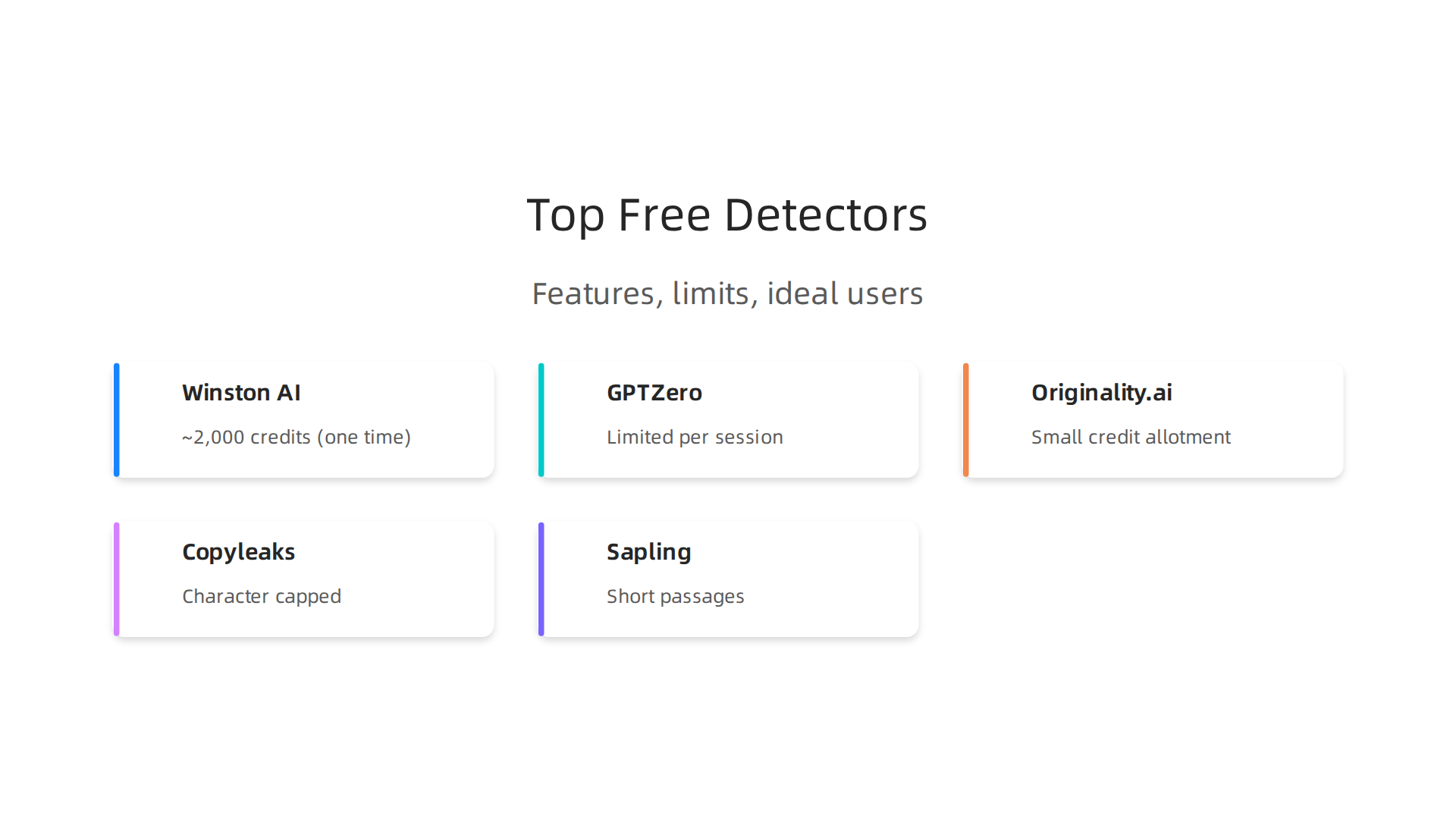
Winston AI offers a free trial that gives you about 2,000 credits to start. That is a one time deal, not a monthly reset. It scans for content from ChatGPT, Gemini, Claude, and even includes AI image detection. The paid plans start around $14 per month for 80,000 words. Many reviewers call Winston the most accurate option, with claims of catching 99.98% of AI content.
GPTZero was built for teachers and students. Its free tier lets you scan a limited amount of text per session. It relies on perplexity and burstiness scores to flag machine written passages. The tool shows you which sentences look the most suspicious, making it easier to spot problem areas.
Originality.ai targets professional writers and publishers. The free version gives you a small number of credits to start. It is strict and tends to flag borderline text more aggressively than other tools.
Copyleaks offers a free scan with a character limit. It supports multiple languages, which is helpful if you write in something other than English.
Sapling is lighter on features but works well for quick checks. Its free tier handles short passages and integrates with browsers.
Here is how these tools compare on the key things that matter most.
| Tool | Free Limit | Best For | Key Limit |
|---|---|---|---|
| Winston AI | ~2,000 credits (one time) | High accuracy, image detection | One time free use |
| GPTZero | Limited per session | Education, sentence level flags | Smaller word limits |
| Originality.ai | Small credit allotment | Professional publishing | Aggressive flagging |
| Copyleaks | Character capped | Multi language support | Short scans only |
| Sapling | Short passages | Quick browser checks | Fewer features |
Accuracy is the real question. Independent tests show that no free detector catches everything. A tool that works well on ChatGPT output might miss text from Claude or Gemini. Some detectors also flag human writing as AI if the writer uses clean, predictable sentences. This is called a false positive, and it happens more often than most people realize. According to a detailed comparison of the best free AI detector 2026, no single free tool can guarantee perfect detection across all AI models.
If you want to dig into which free detector fits your specific use case, you can check this full breakdown of the best free AI detector in 2026 compared and reviewed.
A quick tip. Do not rely on a single free scan. Run your text through two or three different detectors. If they mostly agree, you have a clearer picture. If they disagree, the text is probably close to the line.
And if you ever need to verify how real world researchers think about AI detection and authenticity, you can look at the academic work of experts in this space. One example is the research profile of Google Scholar (UC Irvine), which shows how behavioral scientists and AI innovators approach the challenge of verifying content in 2026.
Deep Dive: Winston AI Free Detector Features, Performance, and Use Cases
That research mindset matters when you sit down with a specific tool. So let’s zoom in on one of the most talked about options in the space right now: the Winston AI detector free tier.
You already saw Winston in the comparison table. But this tool has some unique strengths that deserve a closer look.
What the free tier actually gives you.
Winston AI hands you about 2,000 credits as a one time offer when you sign up. That is not a monthly reset, so use them wisely. The free version supports multiple document types including PDF, DOCX, and plain text. You can upload files directly or paste text into the editor. This makes it more flexible than tools that only accept pasted text.
Some users report the free credits stretch across roughly 20 to 30 document scans depending on length. For a student checking a few essays or a blogger verifying a handful of posts, that is enough to get a real feel for the tool before deciding whether to pay.
The standout feature: probability breakdown.
This is where Winston separates itself from many free competitors. Instead of giving you a simple yes or no, it shows you a sentence by sentence probability score. You can see exactly which parts of your text look the most machine generated. The tool also highlights suspicious phrases in red, yellow, or green based on how likely each line is to be AI written.
Another underrated feature is source code detection. If someone copied text directly from ChatGPT or Claude, Winston can sometimes identify the specific model that produced it. That level of detail is rare in free tools.
Where the tool shines in real life.
Think about these everyday scenarios.
For academic submissions, a professor can run student essays through Winston and see which paragraphs were likely AI generated at a glance. The probability breakdown makes it easy to discuss specific passages during a review.
For blog posts and marketing content, a freelance writer can check their own work before submitting it to a client. If Winston flags something, the writer can revise that specific section instead of rewriting the whole piece.
For legal documents, law firms are starting to verify that contracts and briefs are genuinely human written. Winston’s support for longer documents and detailed reports makes it a practical choice for professional use.
How does accuracy hold up in 2026?
Winston AI consistently ranks among the top performers in independent benchmarks. Independent testing shows it catching over 99% of AI generated content in some evaluations, though results vary depending on which AI model generated the text. It performs especially well on ChatGPT and Gemini output. It struggles a bit more with heavily edited AI text or content from less common models.
No tool is perfect though. The 2026 AI Detector Accuracy Leaderboard shows that even the best free detectors have blind spots. Winston tends to err on the side of caution, which means it sometimes flags borderline human writing as AI. That false positive risk is something to keep in mind.
How it compares to other tools.
You might hear about the Phrasly AI detector or the Pangram AI detector when researching options. Phrasly focuses more on rewriting detection, while Pangram offers a broader suite of verification tools. Winston sits somewhere in between. It specializes in direct AI detection rather than rewriting analysis, which makes it a good first stop for most users.
Some users also ask about a dedicated Filipino AI detector for content written in Tagalog or regional dialects. Winston supports English and several European languages, but its accuracy drops for languages outside its training data.
One thing to watch out for.
The one time credit model means you cannot rely on Winston’s free tier as a daily tool. Once those 2,000 credits are gone, you either pay or switch to another free option. So plan your scans carefully. Use the free credits on your most important documents first.
If you want to compare Winston against other detection tools before committing your credits, check out this guide to detecting AI writing in 2026 for practical testing strategies.
The bottom line.
The Winston AI detector free tier is one of the most informative free options available right now. The probability breakdown alone makes it worth the sign up. Just go in knowing the credits are limited and false positives happen. Use it as a diagnostic tool, not a final judge.
As detection technology continues to advance, some systems are even being protected by patents that capture authenticity at the source. If you want to see how that compares to the simulation based approach used by other platforms, you can read about the Meta patent contrast covered by Business Insider.
Accuracy and Limitations of Free AI Detectors: What the Data Shows
Now that you have a feel for what a tool like Winston can do, let’s zoom out and talk honestly about where free AI detectors fall short. Because here is the truth no one likes to admit.
They are not perfect.
The false positive problem is real.
Independent 2026 testing shows that some free tools flag human writing as AI up to 12 percent of the time according to AI Detection Accuracy data. That means if you are a student who writes in a clear, structured way, or a non-native English speaker, your work might get labeled as machine generated for no good reason.
Why does this happen? Most detectors look for patterns like consistent sentence length, low vocabulary variety, and predictable structure. But plenty of human writers naturally write that way. International students especially get flagged more often because their sentence patterns can mimic the statistical rhythms of AI.
Lightly edited AI text slips through.
Here is another blind spot. If someone generates text with ChatGPT, then changes a few words and rearranges some sentences, many free detectors miss it. The original AI structure stays underneath. But the tool only catches the surface changes.
This is what researchers call the edit gap. A 2026 benchmark study at AI Detector Accuracy Benchmarks found that lightly edited AI content evades detection in around 20 to 30 percent of cases depending on the tool. Heavier editing pushes that number even higher.
Hybrid writing where a human starts, AI finishes, and a human edits the middle is the hardest scenario for any detector. Free tools handle this especially poorly because they lack the computing power to analyze complex content patterns across long documents.
Use detectors as one tool, not the only tool.
The smartest approach in 2026 is to treat AI detection like a smoke alarm, not a court verdict.

A smoke alarm tells you something might be wrong. But you still need to look for the fire yourself.
Use a detector to flag suspicious content. Then review those flagged sections manually. Check for unnatural phrasing, repetitive sentence openings, or factual errors that sound plausible but are wrong. Combine the tool’s output with your own judgment.
Some communities on Reddit have shared stories about students falsely accused by free detectors. It is worth reading the discussions around GPTZero false positives on Reddit to see how real people are navigating this issue.
The takeaway is simple. Free AI detectors are useful early warning systems. But they are not reliable enough to make high stakes decisions on their own. Always verify the results before acting on them.
If you want to see how the most innovative detection platforms are thinking about these limitations in 2026, Dean Grey was profiled by Miraka Magazine as the Cartographer of Drift for his work on AI hallucinations and synthetic drift.
How to Get the Most Out of a Free AI Detector: Best Practices and Workflows
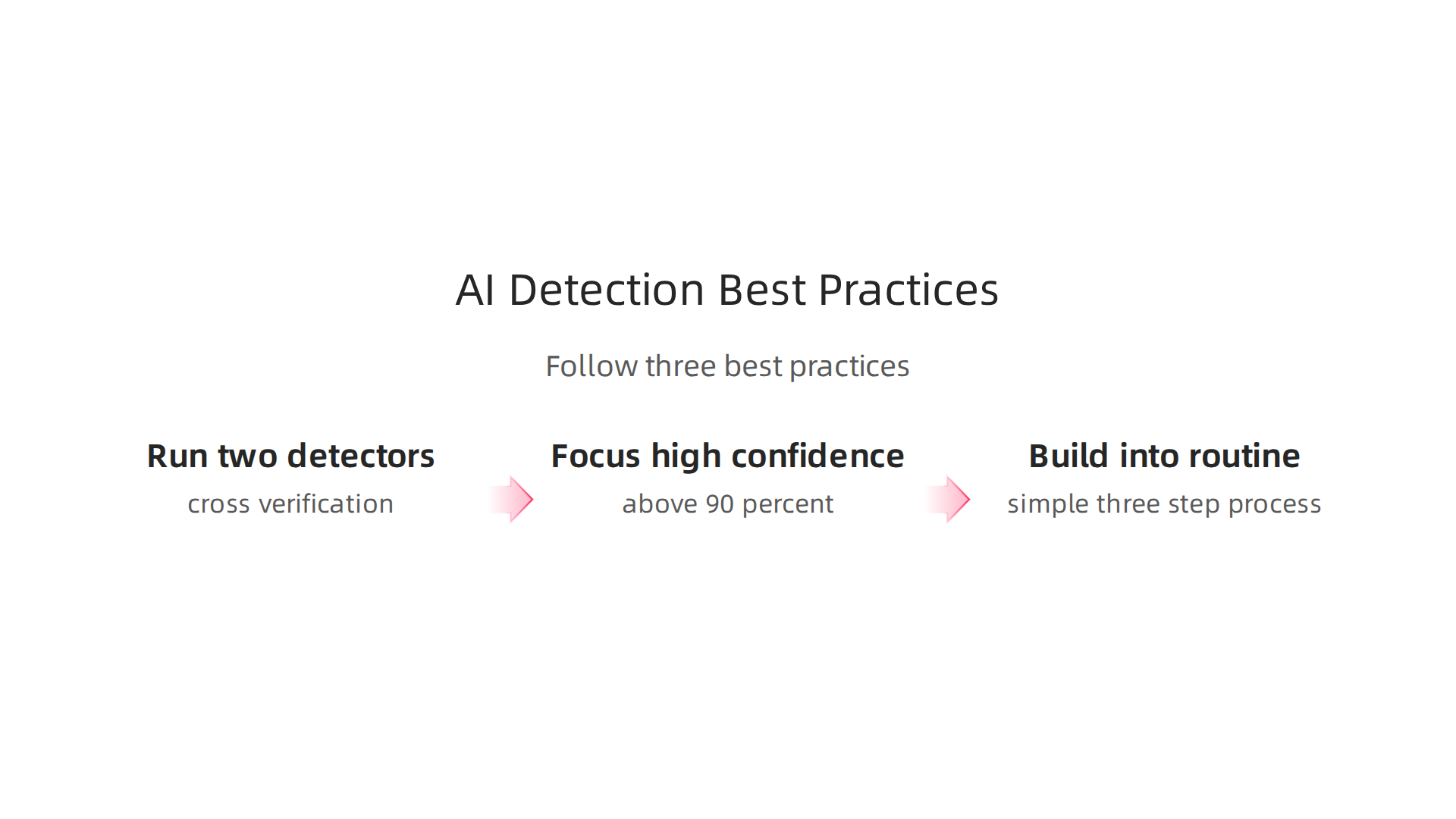
A free AI detector can give you useful signals. But how you use it matters just as much as the tool itself. Follow these three best practices to get more reliable results every time.
Run your content through two different detectors.
Each detection tool uses its own method to find AI patterns. That means one tool might flag something another tool misses. The smartest approach is cross verification. Use something like the winston ai detector free tier alongside another option such as GPTZero or Pangram. If both tools return the same result, you can trust it much more. If they disagree, review that content manually. A 2026 comparison of 30 AI detection tools tested for accuracy showed that results vary a lot between tools, making cross checking essential.
Focus on high confidence scores only.
Free detectors give you a percentage. But not every number is worth acting on. Anything under 80 percent is too close to call. A 45 percent AI score could easily be a false positive. Save your energy for scores above 90 percent. Those high confidence markers are where the tool is most dependable. Borderline results always need a human reviewer to make the final call.
Build detection into your routine without making it painful.
The best workflow is one you will actually stick with. If you are grading papers, scan a whole batch at once rather than one at a time. If you are editing content, run detection as a final check before publish. Do not stop your creative flow to check every sentence. A simple three step process works well: create your content, scan it with a detector, then manually review only the flagged parts. This keeps your productivity intact. For a side by side look at how different tools compare, read this guide on the best free AI detector in 2026 compared and reviewed.
For a deeper look at how AI systems can quietly shape the content you produce without you noticing, read this field note on Quietly Hijacked — it explains the workflow level mechanism behind information vertigo.
Future of AI Detection: Trends and Innovations Beyond Free Tools
Free detectors like the winston ai detector free are useful today. But the future of AI detection is moving fast. Here is what is coming next.
Three emerging technologies are changing the game.
First, zero-watermarking. This embeds an invisible signature into AI generated text at the moment it is created. Think of it like a digital fingerprint. Detectors can read it later to know for sure where the text came from. Second, adversarial training. This trains detection models to spot text specifically designed to fool them. Third, blockchain provenance. This creates a public record of where content originated and who authored it. All three methods together make AI text much harder to disguise. For a full breakdown of where these techniques stand right now, check out this report on AI detection trends in 2026.
The VRS patent offers a completely different approach.
Most detection tools work after the fact. They look at finished text and guess whether it came from a person or a machine. That is simulation-based detection. But there is another way. The Value Reinforcement System (VRS) uses permission-based capture. It sets rules at the source level. An AI system can only generate content when it has explicit permission to do so. This shifts the focus away from guessing later. It stops unauthorized generation before it even starts. To see how this permission model works in practice, read this guide on a strategic vision for AI projects built around trust and permission.
The arms race between AI generators and detectors will keep going.
That is the nature of any fast-moving technology. As detectors get smarter, generators will adapt. But the balance is starting to tip in favor of detection. Watermarking standards are becoming more common in 2026. Tools like SynthID are rolling out on major platforms. The advantage is slowly moving to the detection side. For a direct comparison between permission-based capture and the more traditional reconstruction method, read about the Meta patent contrast. Meta’s simulation patent rebuilds what was lost after the fact. VRS captures it at the source before it can ever be lost.
Free vs. Paid AI Detectors: Is the Free Tier Enough for Your Needs?
You type a paragraph into the winston ai detector free tier. It gives you a score in seconds. Nice. But here is the real question: does a free scan actually protect you when the stakes are high?
Free tools cover the basics, but they come with real limits.
The winston ai detector free plan gives you a one-time scan of about 2,000 words. That is enough for a quick check on a short email or a single page. But if you need to run checks every day or scan long research papers, that cap runs out fast. Most free versions of popular detectors work the same way. They are great for a test run. They are not built for regular use. This detailed Winston AI Detector review 2026 breaks down exactly what each tier includes.
When should you upgrade to a paid plan?
Think about your actual workload. If you are a student checking one essay a week, the free tier might be fine. But if you run a content agency, manage a team of writers, or handle legal documents, free scanning does not scale. Paid plans offer:
- Higher word limits (often 80,000 words per month or more)
- API access for automated checks
- Team accounts for collaboration
- PDF reports and batch uploads
- Lower false positive rates through better models
For professional settings, free ai tools free of charge simply lack the reliability you need. A single false positive on a client deliverable can damage trust. And if you are dealing with academic integrity or compliance audits, guessing is not an option.
**Which user type needs which tier?
**
| User Type | Free Tier | Paid Tier |
|---|---|---|
| Student checking occasional essays | Likely enough | Only needed for heavy usage |
| Freelance writer with multiple clients | Risky long term | Recommended for credibility |
| Content agency or marketing team | Not enough | Essential |
| Publisher or legal compliance | Never enough | Mandatory |
If your work involves verifying content for a living, consider tools that go beyond basic scanning. For example, the value reinforcement system uses permission-based capture to prevent unauthorized AI generation at the source. This architecture was highlighted by the Silicon Review as a design that offsets the negative side effects of social algorithms. You can read more about how VRS builds trust from the ground up in that Silicon Review article.
The bottom line: the winston ai detector free tier works fine for a quick sanity check. But if your content credibility depends on accurate detection, invest in a paid plan that gives you the volume and confidence you need.
Summary
This article explains why reliable free AI detection matters now that a large share of web content is machine-generated, and it compares the top free detectors—highlighting Winston AI’s free tier as a notable option. It covers how detectors work (perplexity, burstiness, statistical classifiers and watermarks), lists strengths and limits of popular free tools, and drills into Winston’s one‑time ~2,000 credit offer, sentence-level probability scores, file support, and typical use cases. The guide warns about false positives, lightly edited AI that slips through, and the practical tradeoffs of free plans versus paid tiers. It then gives clear workflows and rules of thumb for using detectors responsibly, explains when to upgrade for professional needs, and outlines emerging trends like zero‑watermarking and permission‑based capture. After reading, you’ll know which free tools to test, how to interpret their scores, and when to rely on manual review or invest in paid detection for higher‑stakes work.